Your cart is currently empty!
Creality Fan Mount
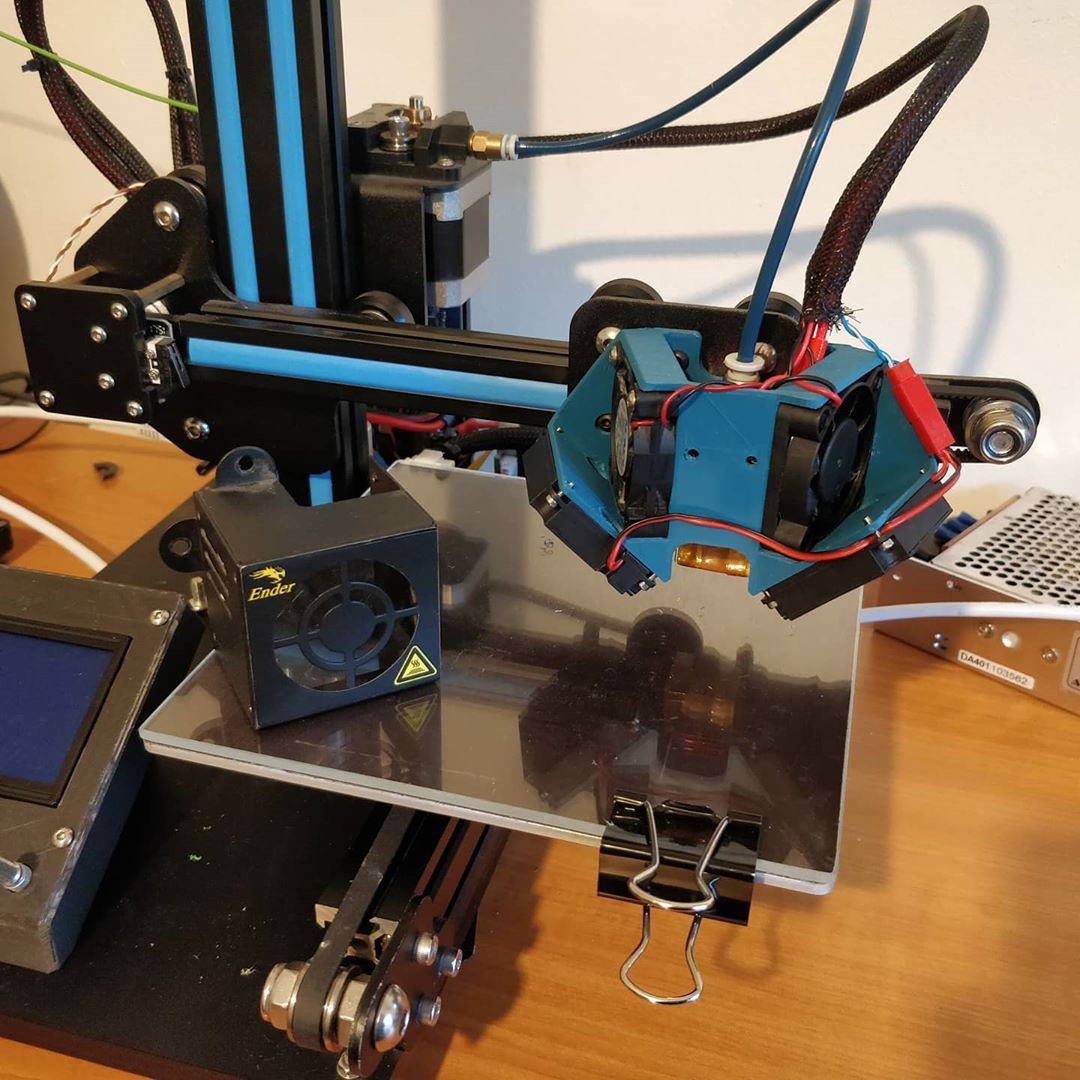
I have two problems with the fan mounts on the Creality printers.
First the fan shroud, especially with any part cooling fans mounted to it, obscures all view of the nozzle. This makes it hard to observe print quality especially during the first few layers when they are most important.
Second the design does little to separate the airflow between heatsink cooling and part cooling. While this does mean that the printer can work with just single fan it means you can’t individually control the part cooling, something you may want to do when printing ABS or PETG.
I have an Ender 2 that I got to see how good cheap printers were (turns out pretty good). Its since been overhauled with a Duet Maestro board (very much overkill) and a glass build plate. From factory it had no part cooling fan and although I added two to either side of the fan mount I’ve never been satisfied with the cooling. The cooling shrouds took an immediate 90 degree turn limiting airflow.
My Design:
Although my initial design started out life more typically with a single axial fan aimed at the heat sink I quickly realised that there was more than enough space to mount a second fan. I quite like the symettry of the design and a push-pull configuratiuon on the heatsink fans is no bad thing.
The blowers are angled down and back slightly towards the nozzle so they don’t require additional shrouds though I may add some in the future.
Mounting is achieved using the existing features on the X-Axis carriage.
The files as always are available on Thingiverse
Leave a Reply